
If you are choosing an SD card for the Nintendo Switch 2, the fastest way to get started is to first confirm the “supported standard (compatibility).” Nintendo has explicitly stated that the only SD cards usable with the Switch 2 are microSD Express cards, and has provided specific conditions such as “up to 2TB.”
Meanwhile, SD card labeling often mixes “maximum speed (peak)” and “minimum guaranteed speed (class).” In this article, we will break down the hierarchy of standards (Size → Capacity Classification → Bus → Class) and the variations based on intended use, so you can make an informed choice yourself.
What you will learn in this article!
What is an SD card?
An SD card is a removable memory card used to store and read data when inserted into a compatible device. Even if they look similar, if the size or standard does not match, you may encounter issues like “cannot insert,” “not recognized,” or “performance not achieved.”
 Ms.ガジェット
Is it bad to just look at the capacity when buying?
 Mr.ガジェット
It won’t work if the size or standard doesn’t match.
Essential knowledge for choosing an SD card
Key points of this section!
- What is a form factor? (SD/miniSD/microSD)
- What is capacity classification? (SDSC/SDHC/SDXC/SDUC)
- What are bus standards? Theoretical limits and backward compatibility ranges
- What is a speed class? How to read minimum guarantees (continuous write)
- What is app performance class? A guide to random performance (A1/A2)
- What is the overall picture of standards and classes? A comprehensive table to decipher logos
Here, we will quickly cover the “essential terms for narrowing down your candidates.” SD cards have a hierarchical structure of standards, where capacity classification, bus standards, and speed classes coexist as separate entities. Since labels often mix “maximum values” and “minimum guarantees,” organizing which number means what will stabilize your decision-making.
What is a form factor? (SD/miniSD/microSD)
An easily overlooked factor is “physical size,” which determines whether it can be inserted at all, regardless of performance. If the size is different, it is treated as a separate category, even if the capacity classification and speed class are the same. It is worth confirming the slot shape (SD or microSD) first.
| Type | Dimensions (Approx.) | Notes |
|---|---|---|
| SD | 32×24×2.1mm | Standard “Full Size” |
| miniSD | 21.5×20×1.4mm | Rarely seen in current applications |
| microSD | 15×11×1.0mm | Mainstream for small devices |
Mr.ガジェットSmall game consoles like the Switch, as well as smartphones, basically use microSD cards!
What is capacity classification? (SDSC/SDHC/SDXC/SDUC)
While “larger is safer” is a common sentiment for capacity, compatibility and standard file systems change depending on the classification. Especially in older or certain devices, it will not be recognized if the classification does not match.
Before choosing based solely on the capacity number, it is safer to check the classification (SDSC/SDHC/SDXC/SDUC).
 Mr.ガジェット
This is where people make mistakes, so please pay close attention!
| Classification (Logo) | Capacity Range (Standard Guide) | Standard File System | Key Compatibility Point |
|---|---|---|---|
| SDSC (SD) | 2GB or less | FAT12/16 | Easily compatible with older devices, but capacity is small |
| SDHC | Over 2GB to 32GB | FAT32 | Check, as SD-compatible devices are not necessarily SDHC-compatible |
| SDXC | Over 32GB to 2TB | exFAT | Check if the device assumes SDXC/exFAT |
| SDUC | Over 2TB to 128TB | exFAT | Compatible devices are limited; checking specifications is a prerequisite |
What are bus standards? Theoretical limits and backward compatibility ranges
The “maximum transfer speed” is determined by the combination of “card + device (host) + reader,” not by the card alone. Bus standards are the main factor that changes the speed limit when the same card is inserted into different devices. Understanding this helps reduce both over-spec and under-spec purchases.
- Check these:
- Notation: Whether it supports UHS-I/II/III, SD Express, etc.
- Unit: MB/s (Bus maximum; actual speed depends on conditions)
- Conditions: Does the host side support the relevant bus? (The card alone cannot increase speed)
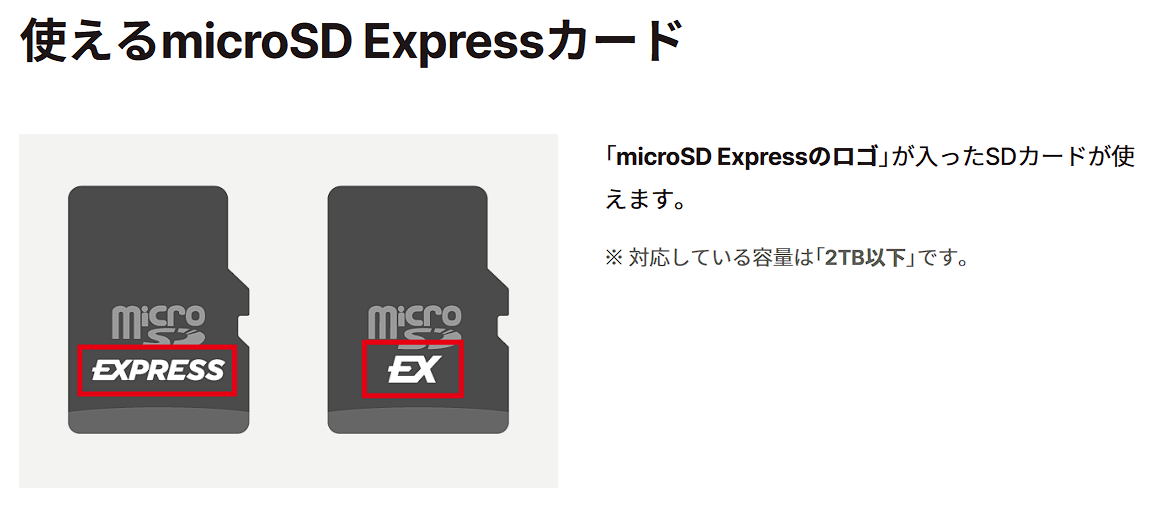 Mr.ガジェット
Note that Switch 2 requires Express, so be careful!
| Bus Standard | Theoretical Max Transfer (Bus Bandwidth Limit) | Positioning |
|---|---|---|
| Default Speed | 12.5 MB/s | Basic Bus |
| High Speed | 25 MB/s | Legacy Speed-up |
| UHS-I | 50 MB/s (SDR50/DDR50), 104 MB/s (SDR104) | Widest compatibility among high-speed types |
| UHS-II | 156 MB/s (Full Duplex), 312 MB/s (Half Duplex) | Generation with additional terminals (2nd row) |
| UHS-III | 312 MB/s (Full Duplex), 624 MB/s (Full Duplex) | Top of the UHS series |
| SD Express (PCIe Gen3×1) | 985 MB/s | PCIe/NVMe Generation (1st stage) |
| SD Express (PCIe Gen4×1 or Gen3×2) | 1970 MB/s | PCIe/NVMe Generation (Expanded) |
| SD Express (PCIe Gen4×2) | 3940 MB/s | Max bandwidth in full size |
What is a speed class? How to read minimum guarantees (continuous write)
The speed class is a “guaranteed value” that ensures “at least this much continuous write speed.” Peak speed and random performance have separate standards.
On the other hand, even with the same numbers, conditions can differ across different standards (Speed Class/UHS Speed Class/Video Speed Class/SD Express Speed Class). It is important not to confuse them just by looking at the numbers.
Mr.ガジェットThis is a very important standard, especially for video recording and continuous data logging.
| Category | Label Example | Min. Continuous Write (Standard) |
|---|---|---|
| Speed Class | C2/C4/C6/C10 | 2/4/6/10MB/s |
| UHS Speed Class | U1/U3 | 10/30MB/s |
| Video Speed Class | V6/V10/V30/V60/V90 | 6/10/30/60/90MB/s |
| SD Express Speed Class | E150/E300/E450/E600 | 150/300/450/600MB/s |
What is app performance class? A guide to random performance (A1/A2)
For app execution and moving small files, random access is more important than continuous speed. A1/A2 are classes that combine random performance (IOPS) and minimum continuous write speed.
| Class | Min. Random Read | Min. Random Write | Min. Continuous (Sequential) |
|---|---|---|---|
| A1 | 1500 IOPS | 500 IOPS | 10MB/s |
| A2 | 4000 IOPS | 2000 IOPS | 10MB/s |
How to choose an SD card
Key points of this section!
- Physical size
- Standard compatibility: Narrow down by “device side” capacity classification and bus standards
- Capacity: Calculate backward from “usage,” including game size + update buffer
- Minimum guarantee: Decide the class to look for based on “necessity of continuous write”
- Common failures: Standard mismatches, class confusion, and initialization procedures
Ms.ガジェットUltimately, what should I check on the device?
Mr.ガジェットPlease check the instruction manual or product specifications for the “supported card type, maximum capacity, and supported bus/class.”
The order is “size → classification → bus → class.”
Physical size
The most common mistake when choosing an SD card is being blinded by high specifications and buying a card that “cannot be used at all.” Narrow down your selection in the following order:
- Card Type (Highest Priority): For the Nintendo Switch 2, in addition to the microSD size, support for the high-speed “microSD Express” standard is key. To comfortably store and play games, prioritize selecting cards with this label.
- Physical Size: While you can use an adapter to convert a “microSD” to an SD card size, if you mistakenly buy a full-size SD card, there is nothing you can do.
 Ms.ガジェット
“microSD” and “microSD Express” have similar names, but they are different. Please be sure to check the logo on the package before purchasing.
Standard compatibility: Narrow down by “device side” capacity classification and bus standards
“Bigger is not always better.” It is important to know how much your device (host) supports.
- Capacity Classification (SDHC/SDXC/SDUC): Currently, SDXC (up to 2TB) is mainstream, but in the future, the ultra-large capacity SDUC (up to 128TB) standard will also appear. Since the device will not even recognize a classification it does not support, always check the “maximum supported capacity” in the specifications.
Mr.ガジェットThe Switch 2 only supports up to SDXC!
- Bus Standard Limits: Even if a card claims “1000MB/s read,” if the console only supports UHS-I (max 104MB/s), the speed will be capped at 104MB/s. Be aware that “over-spec is a waste.”
Capacity: Calculate backward from “usage,” including game size + update buffer
While “larger capacity is better,” balancing it with cost is a dilemma.
- Calculation Tip: Recent major titles can consume several dozen GB each. Furthermore, capacity inflates with post-release updates and downloadable content (DLC). Set “total of games you want to install now + about 20% buffer” as your minimum line.
- Choose based on usage style:
- Frequent digital buyers: Choose 512GB or more to reduce the hassle of moving data.
- Those who play a few select titles: Keep it around 256GB and move data you no longer play to a PC or cloud.
 Mr.ガジェット
In recent years, even a single game has become large, so it’s good to estimate a significant buffer… though it gets more expensive as a result.
Minimum guarantee: Decide the class to look for based on “necessity of continuous write”
The “max XX MB/s” number written in large letters on the package is just an instantaneous peak value. What relates to game stability is the speed class, which is the minimum guaranteed speed.
- Symbols to look for: Symbols like V30 (Video Speed Class) or U3 (UHS Speed Class) mean “guarantees at least 30MB/s write speed.”
- Beware of class confusion: While “V30” and “U3” both guarantee 30MB/s, their standard definitions differ. Basically, choose one that has the symbol specified by the device (e.g., V30, if V30 is recommended).
Common failures: Standard mismatches, class confusion, and initialization procedures
In conclusion, most failures stem from “misreading labels” and “lack of proper initialization/migration procedures.”
- Reasons:
- There are standards with similar names, such as the confusion between microSD and microSD Express.
- There are cases like V30 and U3 where simple comparisons between classes do not apply.
- Confirmation Points:
- Spec sheets: Official notation of supported standards (both card and device sides).
- Measurement conditions/actual speed: Reports on recognition, requirements for first-time use (e.g., updates).
- Operation: Formatting procedures, insertion/removal, data migration (checking integrity before/after copy).
- Points to note:
- If you still have questions, it is safer to return to “confirming the presence of supported standards/classes in the spec sheet” rather than guessing.
Supplementary terms and specifications
What is SD Express? Mechanism for speed-up via PCIe/NVMe
SD Express is designed to allow access via PCIe/NVMe in addition to the traditional SD interface. Hosts may use methods such as initializing via the SD side and then switching to PCIe, and behavior changes depending on the implementation.
- In short: A method that allows access via PCIe/NVMe in addition to the SD interface.
- What it affects:
- Whether you can use the high-speed side (is the host PCIe/NVMe compatible?)
- Backward compatibility in SD mode (works even with SD-only hosts)
- Interpretation of speed classes (E-series) (assumes PCIe/NVMe access)
- Check these:
- Notation: SD Express / microSD Express, E150–E600 classes.
- Conditions: Does the host assume an initialization method like “SD First”?
- Operation: Heat/power management under high load (can affect sustained performance).
What is LVS? 1.8V low-signal voltage and backward compatibility notes
LVS is used to identify whether host devices are designed to use low-signal voltage. While cards can be used with legacy hosts as backward compatibility, if the host is designed exclusively for LVS, card selection may be limited. This is a topic that often comes up in mobile devices.
- In short: An identification element indicating support for low-signal voltage (1.8V).
- What it affects:
- Compatibility with certain hosts (potential for hosts to require LVS-only cards).
- Compatibility with power-saving designs.
- Check these:
- Notation: Presence of LV symbol on host, support notation on card.
- Conditions: Notes indicating that an LVS host might not accept “non-LVS cards.”
- Operation: Troubleshooting procedures if issues occur with a combination (reproduce by testing with a different card).
Final pre-purchase check (optional)
- For Nintendo Switch 2, double-check that the supported card is microSD Express via the spec sheet and packaging.
- Card size (SD/microSD) matches the device slot shape.
- Capacity classification (SDHC/SDXC/SDUC, etc.) matches the device’s supported range.
- Bus standard (UHS/SD Express, etc.) is understood to require “mutual support between card and host.”
- Speed class is a “minimum guarantee,” so do not confuse it with peak value numbers.
- V/U/C/E can have different conditions even with the same numbers, so do not compare them as equals.
- For performance comparisons, prioritize those where host/reader/test conditions are identical.
- Check if procedures like system updates are necessary for initial use.
- Have decided on removal/backup procedures (recovery in case of damage) beforehand.
Thank you for reading until the end!
- The evaluation in this article is unique to this site.
- Unless otherwise specified, product prices and information are current as of the time of writing.
- Please note that this site cannot be held responsible for any inaccuracies in this information.
- Product and service names mentioned on this site are trademarks of their respective companies.
コメント