
Digital cameras, smartphones, dashcams, and many other devices use SD cards.
However, with so many different capacities, speeds, and standards, many people feel lost and don’t know which one to choose.
In this article, we will explain the standards and how to choose an SD card in an easy-to-understand way.
We will organize the points that are easy to get confused about when choosing, such as capacity, speed, compatibility, and durability, and show the criteria for judging according to the usage.
Whether you are a first-time buyer or are considering replacing your card, acquire the knowledge to avoid failure.
What you will learn in this article!
What is an SD card?
An SD card is a common standard small storage using flash memory.
It is used in a wide range of devices, including digital cameras, action cameras, drones, dashcams, portable game consoles, and smartphones (microSD).
First, you should understand the 4 “axes” in the world of SD cards.
- Shape (external form): SD / microSD
- Capacity logo: SD / SDHC / SDXC / SDUC (= division of the maximum usable capacity)
- Minimum guaranteed speed: Speed Class (C / UHS / Video)
- Upper limit of speed: Bus interface (High Speed / UHS-I / UHS-II…)
As we will discuss in detail in the following chapters, the most important points when choosing are “the capacity logo supported by the device” and “the required minimum write speed”.
If you miss this, the card may not perform well, or may not work at all.
Shape (SD / microSD)
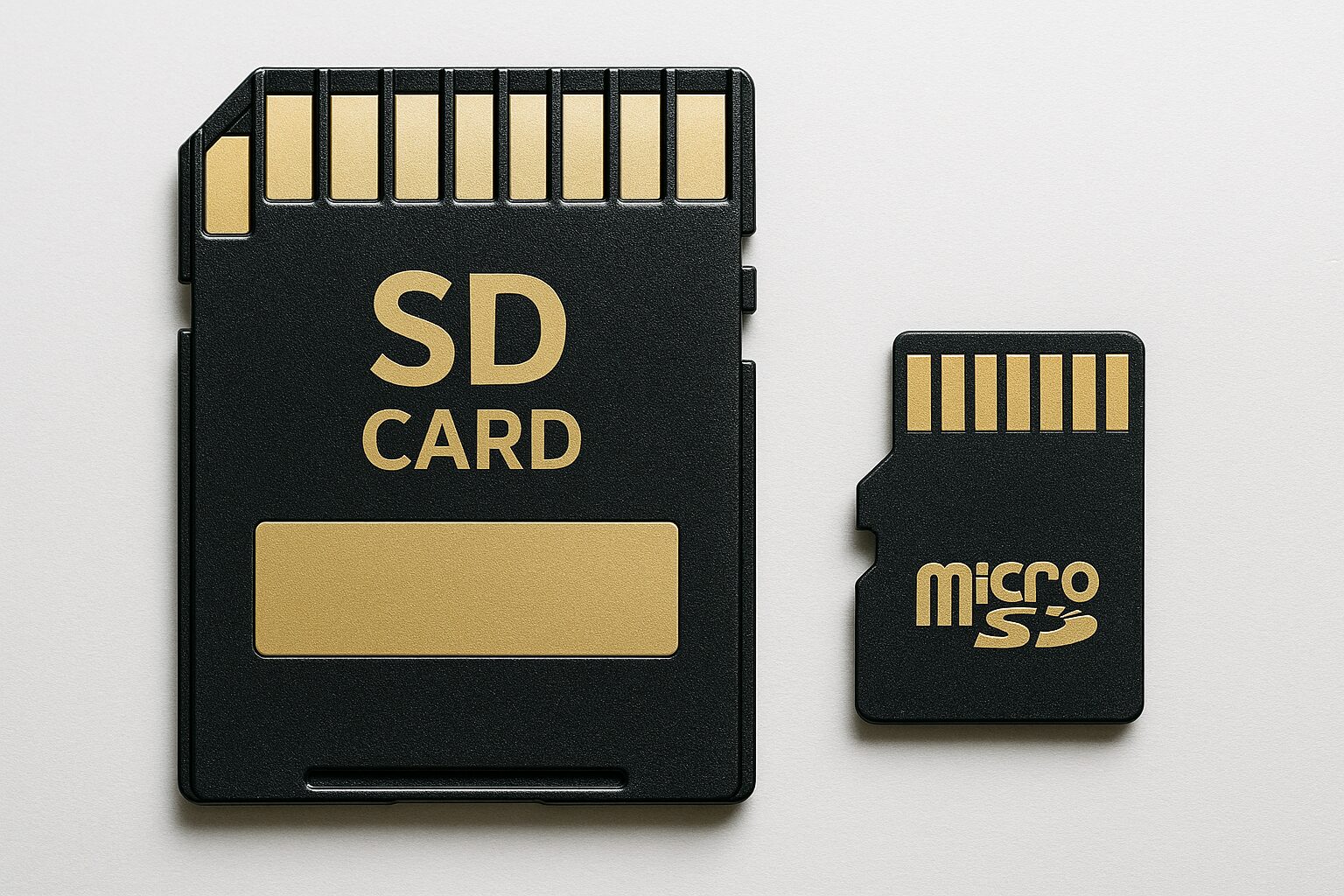
- SD (standard size): 32 × 24 × 2.1 mm.
Mainly used in interchangeable-lens cameras, camcorders, and PC card readers. - microSD: 15 × 11 × 1.0 mm.
Designed for small devices such as smartphones, action cameras, drones, and portable game consoles.
It can be used by attaching it to an adapter in an SD slot.
- Single-lens/mirrorless cameras: Basically, use the SD slot. An SD size is easier to handle in terms of card rigidity and ease of use.
- Small cameras/mobile devices: If the body has a microSD slot → microSD only. Connect to a PC with an adapter if necessary.
The “speed” of an SD card has a two-layer structure
The speed indication of an SD card looks complicated, but it is divided into two layers with different purposes.
- Speed Class (an indicator of recording stability)
C10 / U1・U3 / V30・V60・V90, etc. guarantee “at least this speed can be written” with class notation. This is vital for video recording. - Bus interface (theoretical upper limit)
The speed increases as the stage goes up from High Speed / UHS-I / UHS-II … However, the speed will be limited if the device, card, and reader do not have the same grade.
 Mr.ガジェット
For example, if you insert a UHS-II card into a camera or reader that supports UHS-I, it will operate at the UHS-I upper limit.
What is Speed Class: Minimum guarantee for stable video recording and continuous writing
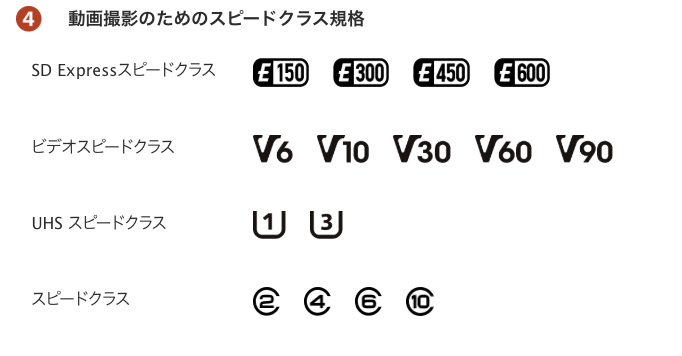
SD cards have class marks such as “C”, “U”, and “V”.
This is a standard that guarantees “at least this speed can be written”, and is directly related to the stability of video recording.
- Speed Class (C): C4 = 4MB/s, C10 = 10MB/s
- UHS Speed Class (U): U1 = 10MB/s, U3 = 30MB/s
- Video Speed Class (V): V30 = 30MB/s, V60 = 60MB/s, V90 = 90MB/s
- SD Express Speed Class (E): E150 = 150MB/s, E300 = 300MB/s, etc.
- Full HD video: C10 / U1 / V10 is often sufficient
- 4K video: U3 / V30 is a common minimum requirement
- 8K video/All-Intra: V60 / V90 recommended (requires device specifications)
What is Bus Interface: A standard that determines the theoretical maximum speed

The speed indication of an SD card may seem complicated, but it is divided into two layers with different purposes.
| Bus standard | Terminal shape | Theoretical upper limit | Main features |
|---|---|---|---|
| UHS-I | 1-stage | 104MB/s | Current standard standard |
| UHS-II | 2-stage | 312MB/s | Faster continuous shooting and transfer |
| UHS-III | 2-stage | 624MB/s | Limited market distribution |
- The speed does not increase if all of the card/device/card reader do not support the same standard
- If you insert a UHS-II card into a UHS-I compatible device, it will operate at the UHS-I speed.
What is capacity standard: a division of the maximum storage capacity
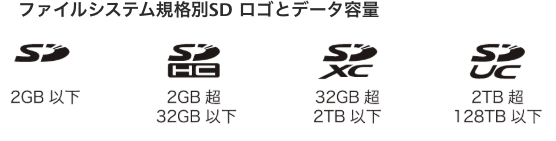
SD cards have a fixed name and logo for each capacity band. This is not just a difference in size, but also includes the format of the file system and rules for compatibility.
- SD: up to 2GB
- SDHC: over 2GB to 32GB (mostly FAT32)
- SDXC: over 32GB to 2TB (mostly exFAT)
- SDUC: over 2TB to a maximum of 128TB (exFAT assumed)
- If the card logo is greater than or equal to the device’s support, it cannot be used (e.g., an SDXC card cannot be used with an SDHC-only device).
- If the device supports a higher grade, a lower grade card can be used (e.g., an SDXC compatible device can use SD/SDHC/SDXC).
- If in doubt, check the “supported logo” in the device’s instruction manual.
Typical uses and indicators that are often needed
- Photography-focused (RAW + continuous shooting): UHS bus and UHS-II are effective.
A Speed Class of C10/U1 is often sufficient, but increasing the interface will shorten the time to release the buffer after continuous shooting. - Video-focused (FHD/4K/8K): The minimum write speed (U3 or V30~V90) is key to stability.
- Smartphone expansion: A1/A2 (application performance class).
- Surveillance/dashcam: High durability and ample capacity.
- Game console: UHS-I is often assumed, and capacity is important.
What is Application Performance Class: For smartphones and app usage

For running apps and saving game data on smartphones and tablets, random access performance is effective.
This is indicated by the A1/A2 mark.
| Standard | Random read | Random write | Sequential write |
|---|---|---|---|
| A1 | 1,500 IOPS | 500 IOPS | 10MB/s |
| A2 | 4,000 IOPS | 2,000 IOPS | 10MB/s |
Note: To take advantage of A2 performance, the device must support command queue and cache functions. In some cases, A1 may be more stable if it is not supported.
First, decide here (introduction check)
- Capacity band supported by the device (SD / SDHC / SDXC / SDUC)
- Usage (photo / video resolution & bitrate / continuous recording / smartphone expansion)
- Required minimum write speed (C / U / V)
- If you want to shorten the continuous shooting/transfer time, consider UHS-II or higher bus.
 Mr.ガジェット
Solidifying these 4 points in advance will make it easier to narrow down the candidates = easier to choose.
- Capacity logo compatibility and minimum write speed. These two determine whether it “can be used” and whether “recording will not stop”.
- “Maximum 〇〇MB/s” is often an indication of read speed. Look at the minimum write speed for stable recording and continuous writing.
How to choose an SD card
Key points of this heading!
- Capacity: Choose a size that matches your usage
- Speed: Secure the necessary transfer performance for your usage
- Compatibility: Be sure to check the device’s supported standards and logos
- Durability: Choose according to the usage environment
- Price and performance: Determine the necessary specifications
When choosing an SD card, it is convenient to check the following 6 criteria in order.
If you think in this order, you can naturally narrow down “which one can be used and which one is necessary”.
Capacity: Choose a size that matches your usage
Determine the capacity based on “usage”, “number of shots/recording time”, and “frequency of overwriting”.
- Photography-focused (RAW + JPEG): Approximately 25-50MB per shot.
→ About 600-1,200 shots on 32GB, double on 64GB. 64-128GB is recommended for travel. - Video-focused (FHD): About 8-12GB per hour (depending on the bitrate).
→ About 3 hours on 32GB, about 6 hours on 64GB. - 4K video (30fps, 100Mbps): About 45GB per hour.
→ About 2.5 hours on 128GB. 256GB or more is realistic for long-time shooting.
Mr.ガジェットLarge-capacity cards are convenient, but the damage from breakage is also large.
For long-term storage or important shooting, it is also effective to divide the capacity and use multiple cards.
Speed: Secure the necessary transfer performance for your usage
Judge the speed by the minimum write speed standard (C/U/V).
- Photography-focused (RAW + less continuous shooting): C10 or U1 is often sufficient
- More continuous shooting/sports photography: Minimum U3, also consider UHS-II or higher to speed up buffer release
- Video (FHD): C10/U1/V10~V30 for stability
- Video (4K): U3/V30 or higher is recommended
- Video (8K or All-Intra): V60~V90 recommended (requires device support)
 Mr.ガジェット
The class mark is more important than the maximum speed number, I think.
Compatibility: Be sure to check the device’s supported standards and logos
- Capacity logo (SD / SDHC / SDXC / SDUC)
- Bus standard (UHS-I / UHS-II…)
- Speed Class (C / U / V)
Durability: Choose according to the usage environment
- Outdoor shooting or travel: Waterproof, dustproof, and temperature resistance
- In-car/surveillance cameras: High durability (emphasis on write endurance)
- Aerial photography/sports: Shock and vibration resistance
 Mr.ガジェット
If you use a low-durability card with a dashcam, the write error may occur in a few months. Durability specifications are insurance for long-term stability.
Price and performance: Determine the necessary specifications
- The price may be more than double if you go for “just in case” high specs.
- A little higher than the performance needed is a good balance of cost and peace of mind.
- For example, if the goal is 4K shooting, V30 is often sufficient instead of V60.
 Mr.ガジェット
Technology is advancing day by day, so you will regret buying something too expensive later 😭
H2 Terms and specifications you should know
Key points of this heading!
SD (Secure Digital)
A common standard small storage using flash memory. Developed by the SD Association.
Features: Small size, removable, and usable with a wide range of devices.
microSD
A smaller version of the SD card (15 × 11 × 1.0 mm). Designed for small devices such as smartphones, action cameras, and drones.
It can also be used in an SD slot with an adapter.
Summary
Although SD cards may all look the same at first glance, there are many factors that affect performance, such as capacity standard, speed class, bus interface, and durability.
To choose the card that is right for your device and usage, it is important to
- Check the capacity band and logo supported by the device.
- Understand the minimum speed required for your usage.
- Check the supported standards of the device.
- Choose durability according to the usage environment.
This order is effective.
Determining the “necessary and sufficient performance” will lead to a balance of cost and peace of mind.
Before purchasing, double-check the capacity logo, speed mark, and supported standards, and choose the one that best suits your shooting and storage style.
コメント